
The Members page: search, follow and contact
Your relatives in three columns, with search, following and the profile card.
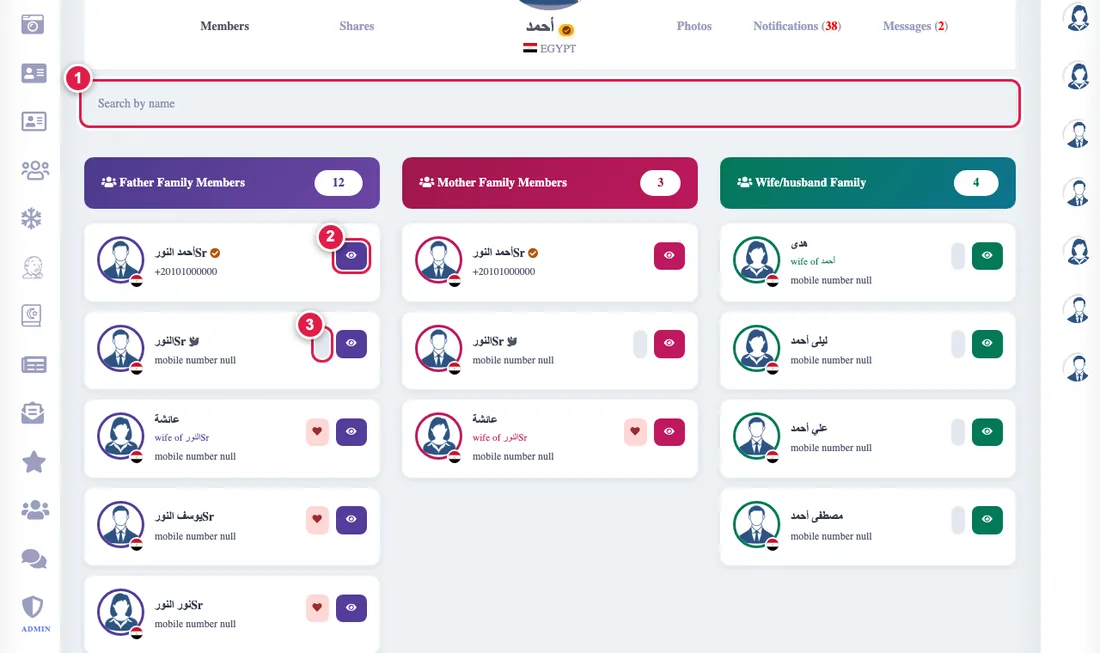
The Members page shows your relatives in three columns: father's family, mother's family and spouse's family.
- Search: type part of a name at the top and all three columns are filtered together.
- Show all: the first 24 cards of each column show, and the button reveals the rest.
- Profile: the eye button opens the person's card: their photo and the details they let you see.
- Following: the heart button makes you follow this relative's activity. See following descendants.
- Phone: the number shows with its country code and calls with one tap, if its owner allows it.
- A golden tick means a complete profile, and a dove icon means the person has passed away.
What you do not see of a person's details follows their choice: privacy.