
Printing the family tree or saving it as a picture
Print the tree on A4, A3 or a poster, choose the background and branch, or save it as a picture and share it.
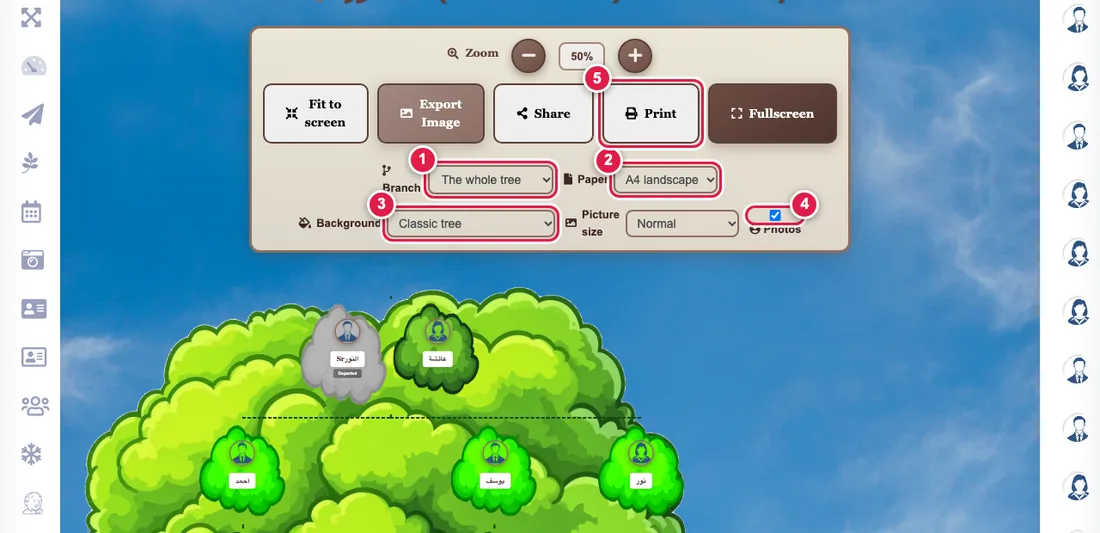
The Father tree print and Mother tree print pages show your tree as a board ready to print or share.
Steps
- Open the page. If your family has many branches, choose the branch you want instead of the whole tree.
- Choose the paper: A4 landscape or portrait, A3, or an A2 or A1 poster.
- Choose the background: classic, white to save ink, a soft colour, or transparent if you will send it to a print shop.
- You can switch photos off for a names-only board.
- Press Print: the tree is fitted to one sheet. You can pick "Save as PDF" in the print window.
Saving as a picture
Press Export image. Choose the picture size (normal, large or poster) to match the print size. On a phone a Share button sends it straight to WhatsApp.
Photos their owners keep private are not printed; a default picture shows instead.