
Organising a share: create, start and confirm payments
Create a share, wait for the members to fill it, then start it and confirm the payments you receive.
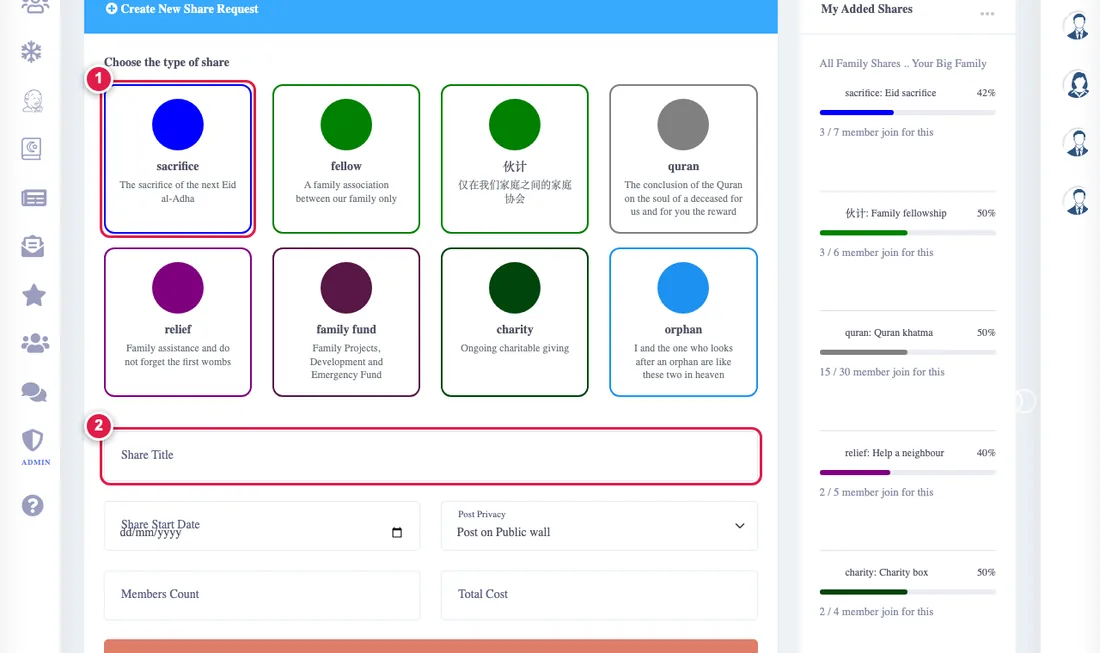
Creating a share
- From What I organise choose the type of share.
- Type the name, start date, number of parts/members and total amount, and choose whether its offer is posted on the family wall.
- Press Post. The parts are created and your relatives get a notice.
A share has at most 60 parts.
Starting
When every part is taken the Start button becomes available. After it starts the membership is closed and nobody new can join. A share with empty parts cannot be started.
Confirming payments
- In the share's card open Members and payments, which opens by itself when something is waiting for you.
- Each member and period has a status: not paid, waiting for confirmation or paid.
- When you receive the money press Confirm. The amount is never counted twice if you press twice.
Deleting
You delete your share from the card's menu if nobody has joined yet. You also get a smart alert when your members say they paid. See alerts.