
Legacy messages: write to your family what you want to remain
Private messages that reach the people you choose after your passing, written and edited whenever you like.
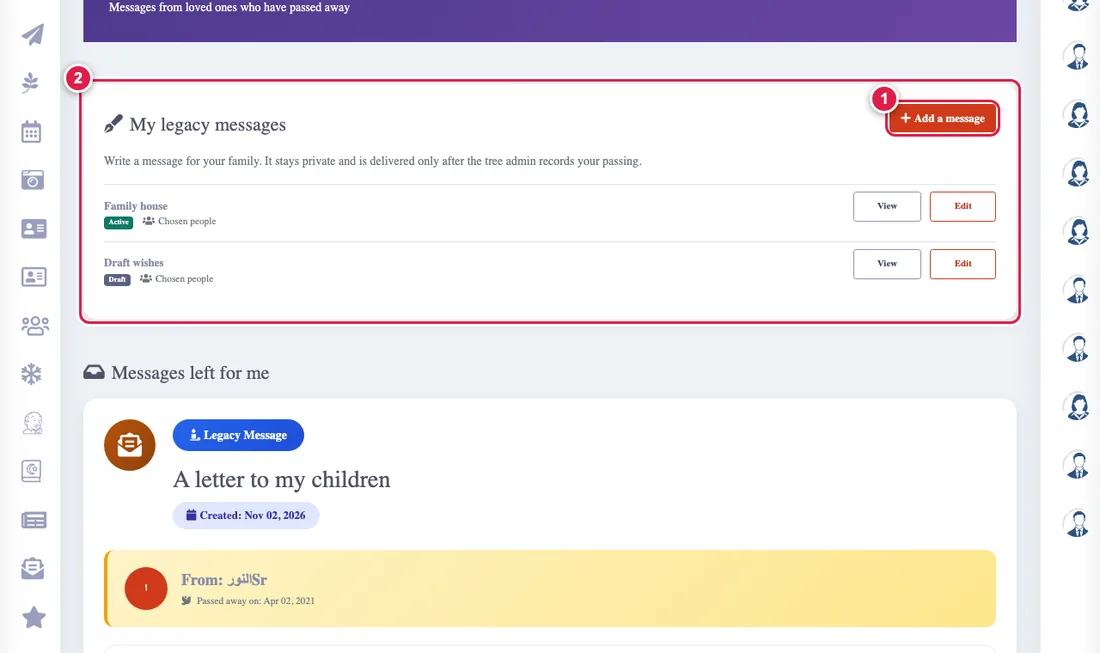
A legacy message is words you leave for your loved ones. It stays private and nobody sees it until the tree admin records your passing: how is that recorded?
Writing a message
- Open Legacy messages, and under "My legacy messages" press Add a message.
- Type the title and text.
- Choose who it is for:
- All my tree: everyone in it, including people added later.
- My close family: parents, siblings, spouse and children.
- Chosen people: a private message for each person you name.
- Choose the status: active (it will be delivered) or draft (never delivered).
Editing and reminders
Edit your messages whenever you like from your list on the same page. The app reminds you to write one if you have none, to activate a draft, and to review an active message once a year. Smart alerts
When a message reaches you
You find the messages relatives left for you in the second section of the same page, "Messages left for me", and you get a notice when they become available.